What is Cloudwork by StudentNet?
Cloudwork is an Identity platform created by StudentNet that Ascham uses to create, manage, and store digital identities including the account that you use to login to the Ascham Hub, and MyMonitor.
When you access a School service such as the Ascham Hub, you will first be directed to Cloudwork and presented with the Ascham login page where you must enter in your email address and password. This login page is part of the Cloudwork platform and once you have successfully logged in, you are then redirected back to the service you are trying to access, for example, the Ascham Hub.
Your username is the primary email address that Ascham has on file for you and will be the email where you receive your School notices and School correspondence.
If you have forgotten your password, please email the Ascham IT Help Desk or call (02) 8356 7004.
Multifactor Authentication (MFA) is a security mechanism used to verify the identity of users during the login process. MFA requires users to provide two or more authentication factors before granting access to a system, application, or account.
For parents of Ascham girls, this means that when accessing the Hub, it may ask you to write in a code that was sent to your phone to access the Hub. This will greatly increase the security of any account and all personal information contained inside it.
This can be achieved by following the steps below:
1. Open the following link: https://ascham.cloudwork.id/account (Updated)
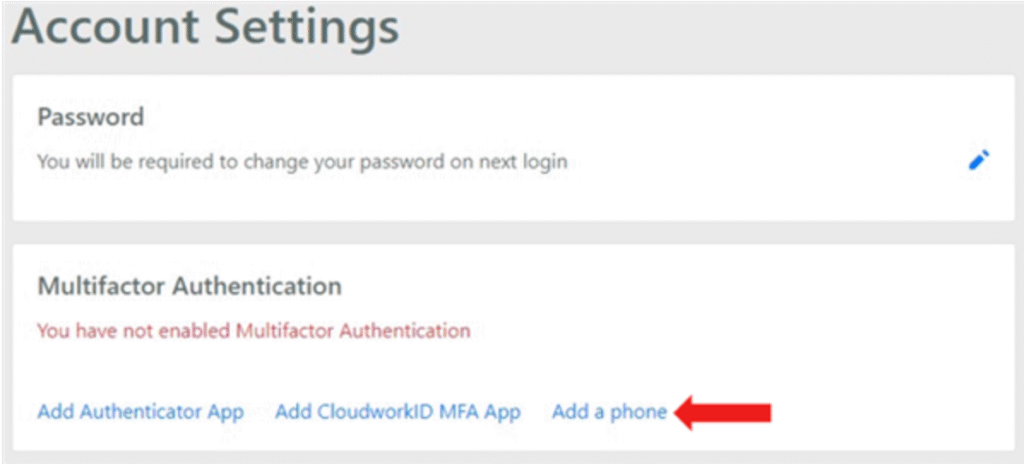
2. On this page, below ‘Multifactor Authentication’, click on ‘Add a phone’.
3. In this page, write in your desired phone number for MFA with no spaces or hyphens.
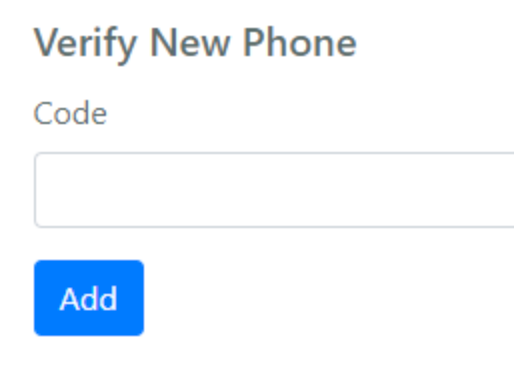
4. After submitting a valid number, this page will redirect you to a new page to input a code from Cloudwork, which you will receive via SMS. Write in the code and click ‘Add’ to confirm the MFA setup.
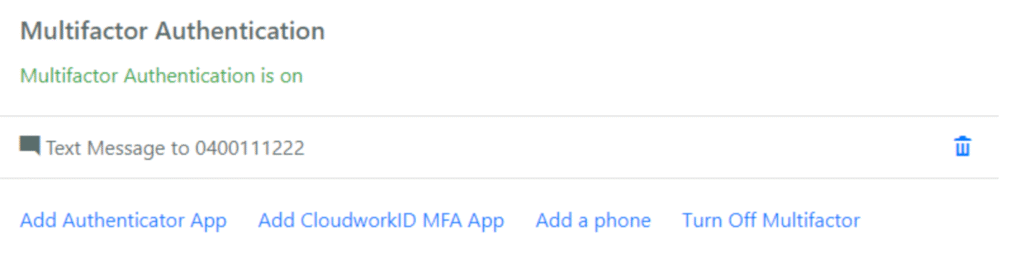
5. Following this step, you will be able to see Multifactor Authentication will be turned on for your account with your phone number. This can be turned off at any time, and you can remove your phone number by clicking the small ‘trash’ icon to the right of the phone number.